ConnectHealth v0.4.0
Run ConnectHealth on AWS or Google Cloud, map FHIR, HL7 v2, X12 and C-CDA without custom templates, and trace every workflow run step by step.
ConnectHealth 0.4.0 gives your team more choice in where integrations run and more control over how health data is shaped. The same release now runs on AWS or Google Cloud. The Mapping Engine converts between FHIR, HL7 v2, X12 and C-CDA without hand-written templates. The Run Inspector shows every workflow execution step by step, and never records patient data. This release also adds CDS Hooks decision support inside the EHR, two-factor sign-in and automatic logoff.
Highlights
Multi-Cloud: AWS and Google Cloud
Run ConnectHealth in the cloud your organization already uses. One release runs on AWS or Google Cloud, and on each cloud it keeps your data in that cloud's own managed services.
- Google Cloud: runs on Google Kubernetes Engine, with secrets in Secret Manager, files in Cloud Storage, and application and audit logs in Cloud Logging. Workload Identity Federation means no long-lived service keys are stored
- The same product on every cloud: the same integrations, workflows, mappings, audit trail and Helix AI assistant, wherever you deploy
- Consistent at scale: every instance of a deployment shares one live state, so a multi-instance deployment behaves the same whichever instance serves a request
- No change for AWS customers: existing AWS deployments upgrade as usual
Google Cloud is available for new installations.
A Richer Mapping Engine
Transformations that used to need hand-written templates are now built into the Mapping Engine, including C-CDA as both a source and a target.
- FHIR Bundle output: map to several FHIR resources at once and get one Bundle
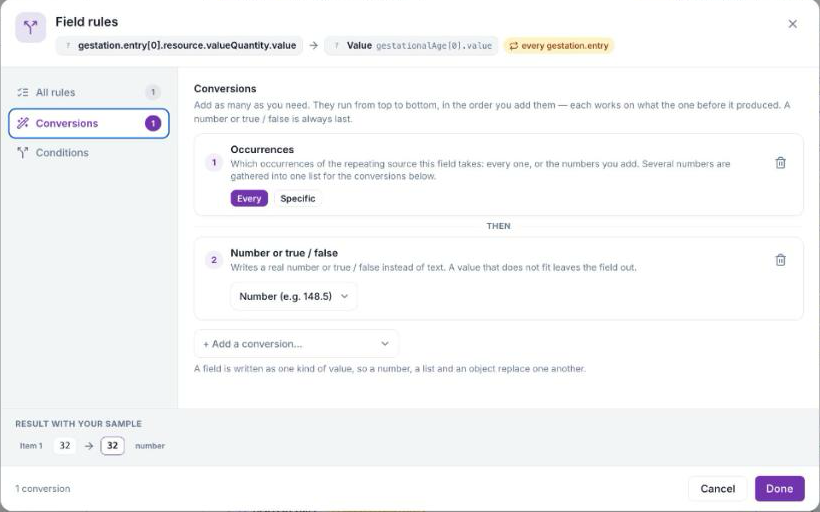
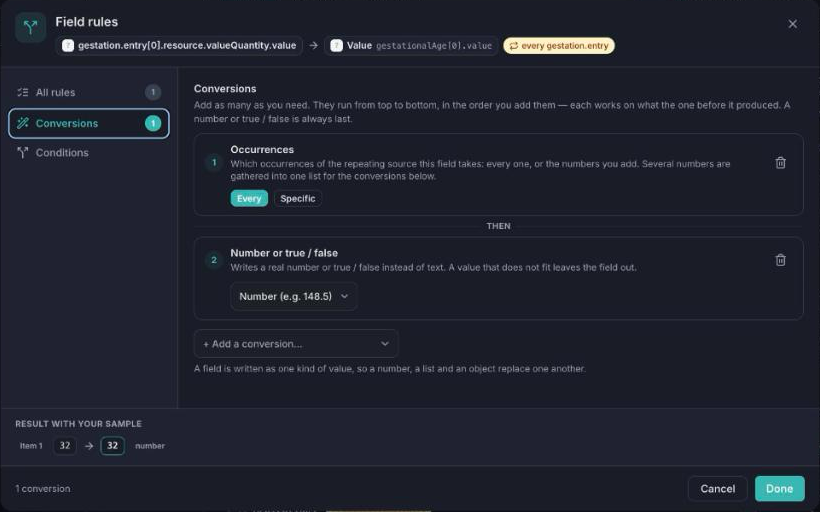
- Built-in conversions: dates and times, letter case, trimming, replacing values, numbers, true/false values and lists, applied in the order you add them, with a live preview
- Several sources into one field: join up to ten fields with a separator, or take the first non-empty value
- Readable HL7 v2 and X12 names: every HL7 v2.1 to v2.8 segment and field, and every X12 005010 segment and element, shown by name as well as by code
- C-CDA in and out: the new C-CDA Parse node turns a CCD, discharge summary or referral note into structured data or a FHIR Bundle. Map from C-CDA with automatic suggestions for problems, allergies, medications, results and more, or produce a C-CDA document from a starter sample
Run Inspector
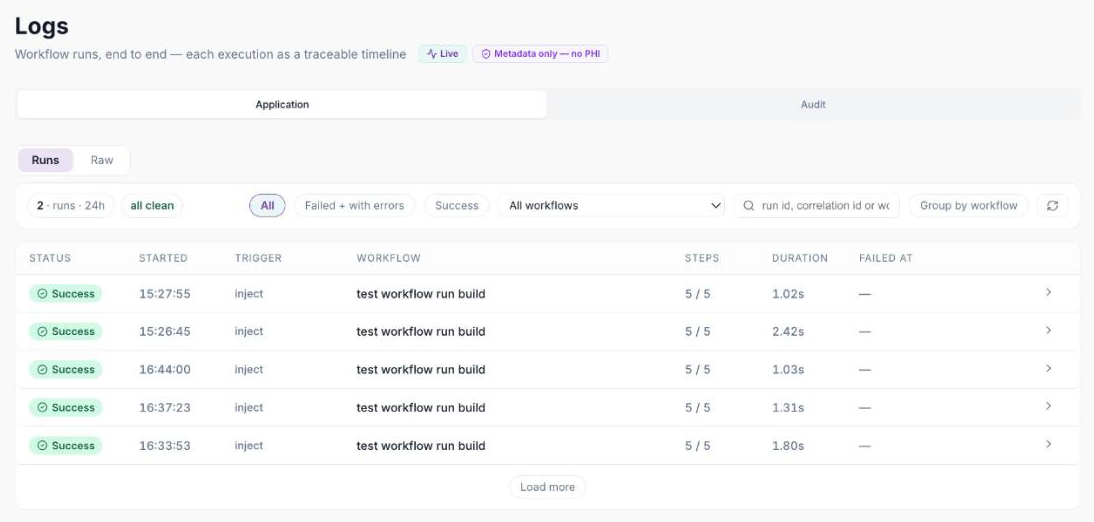
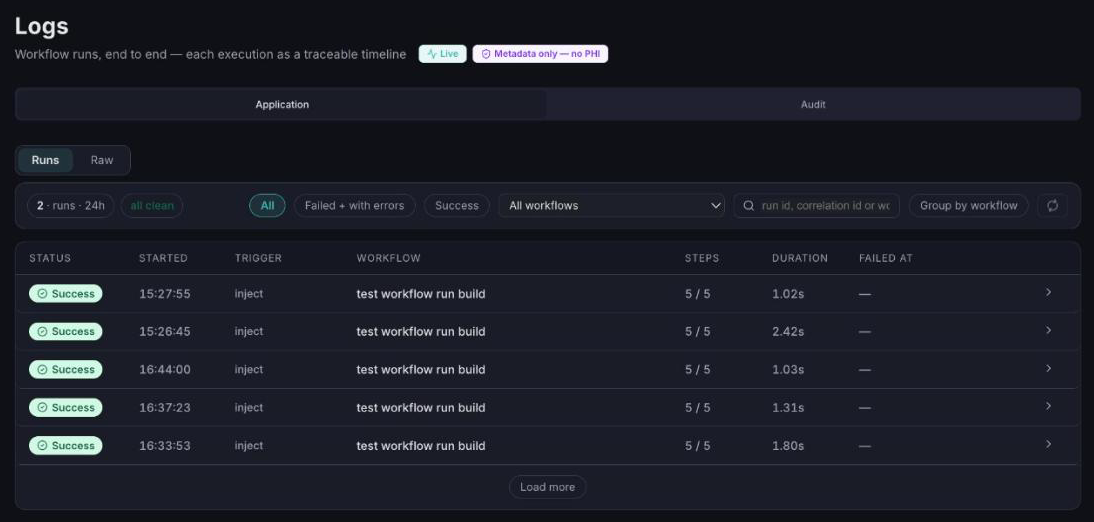
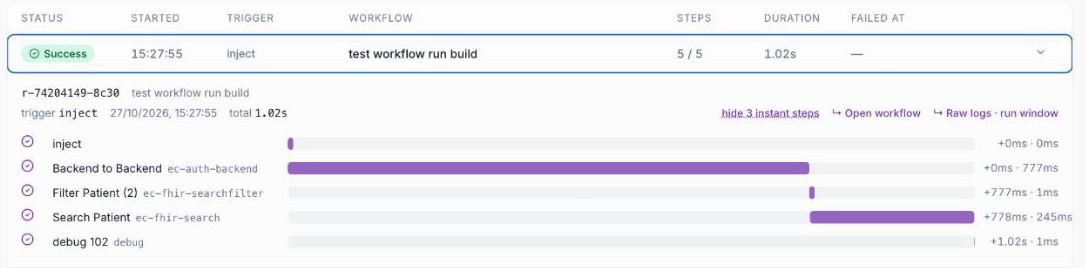
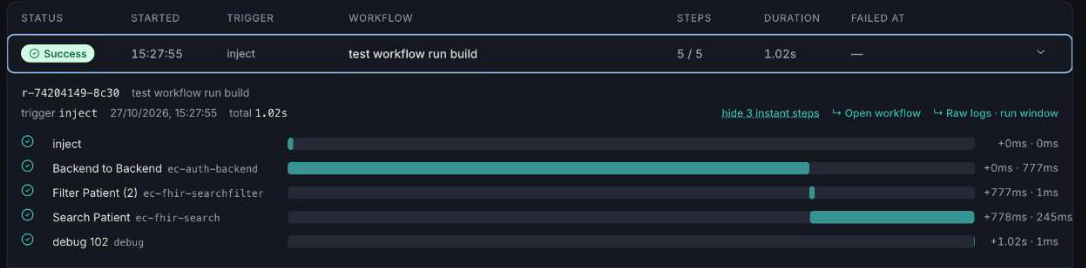
When a result or referral does not reach its destination, your team needs the step that failed, not a wall of logs. The Run Inspector shows one row per workflow execution and a step-by-step timeline for each.
- Every run at a glance: status, trigger, number of steps, duration and the step where it failed
- Filters and grouping: filter runs, group them by workflow with typical durations, and refresh automatically
- Patient data is never recorded: errors are reported by type and code, and data values are not written to the run history
CDS Hooks Decision Support
Deliver your workflow's guidance inside the EHR, in the clinician's existing workflow. ConnectHealth answers CDS Hooks requests, the HL7 standard for decision support, and returns cards to the clinician.
- Built on the open standard: CDS Hooks is not tied to one EHR vendor. Epic connections support it first
- Patient view, order select and order sign hooks, each answered by a workflow you build
- Turned on per connection: the connection page shows the discovery address and the hooks in use
- Verified requests: every EHR call is checked against that EHR's signing keys before a workflow runs
Two-Factor Sign-In and Automatic Logoff
A signed-in screen left unattended can expose patient data. ConnectHealth now warns an idle user, then signs the session out on every open tab. This supports the automatic-logoff safeguard in the HIPAA Security Rule. Users who are working stay signed in.
- Two-factor sign-in: set it up with any authenticator app, with one-time recovery codes for a lost phone
- One active session per user: signing in on a second device ends the first session
- Recorded in the audit trail: two-factor setup, sign-in codes, recovery-code use and logoffs
Also New
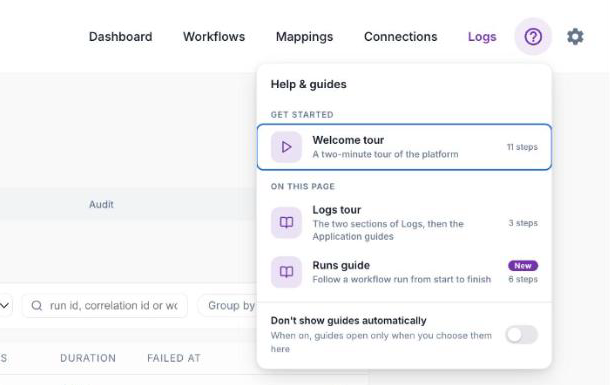
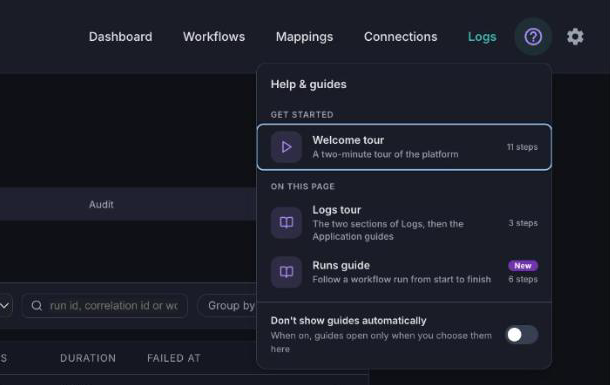
- Built-in guided tutorials: a help button on every page lists the guides for that screen, and a short tour introduces the workflow editor. Each of 80 workflow nodes has a step-by-step guide, with example flows you add in one click. Guides never point at passwords, credentials or patient data on screen
- Workflows as AI tools: the MCP Tool and MCP Response nodes publish a deployed workflow as a tool. AI assistants and agents can discover and call it over the Model Context Protocol. Calls require your API key and are recorded in the audit trail
- EMR Connector: a new node calls an EHR's own API for the data FHIR does not cover, starting with Open Dental. Choose from a catalog of endpoints, with credentials taken from the connection you already set up
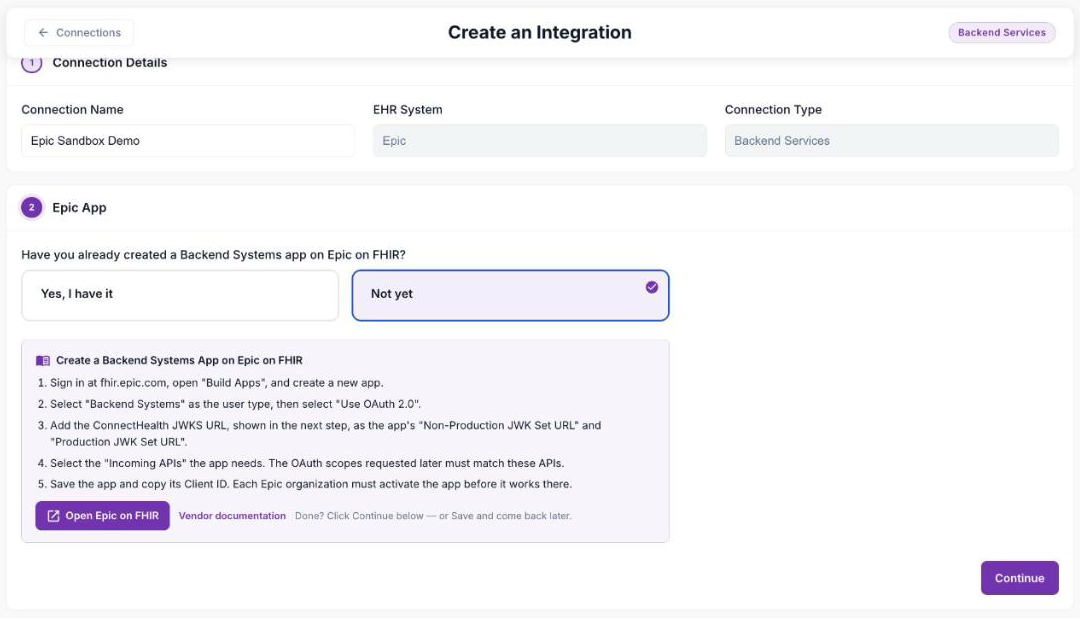
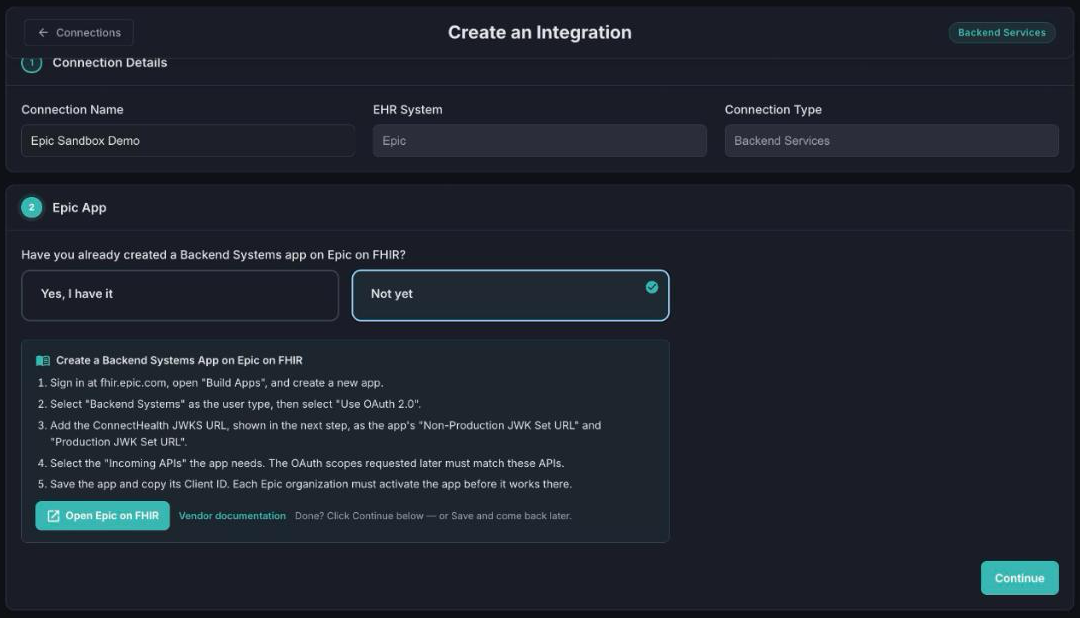
- Guided connection setup: a step-by-step flow for each EHR shows the values you give the EHR, such as callback and launch addresses, before it asks for yours
- ConnectHealth DirectLicense: license ConnectHealth directly, on any cloud, on its own or alongside an AWS Marketplace subscription. Connection limits from both add up, and a 24-hour grace period keeps connections running if a license source is briefly unreachable
- CharmHealth persistent connection: workflows reach CharmHealth system to system over a long-lived connection, and CharmHealth single sign-on returns to the app


Improvements
- Credentials kept out of logs and workflow messages: AI provider keys and EHR client secrets are no longer written where a user or log reader could see them
- Stricter key checks: signing keys are validated when a connection is saved, not only when it is tested
- Encrypted chat history: new Helix chat history is encrypted with your stack's compliance key
- Free sandbox connections: connections to an EHR vendor's test environment no longer use a licensed slot
- Accurate Marketplace counting: only your ConnectHealth subscription counts toward your connection limit
- Nodes named for what they do, so exported workflows and AI assistants can read each step
- Unsaved-changes warning when you leave the workflow editor
- AI model choices: Amazon Bedrock and Google Vertex AI, and a rejected AI credential is reported clearly
- Usage diagnostics: anonymous product usage, meaning which features and node types are used and how often. It never includes names, data values, user identities or patient information
Fixes
- Audit and application logs: later pages no longer repeat or skip events, and the log view no longer stalls while loading
- Connections: a new connection publishes in one step, Test Connection is disabled while you edit, and Cancel restores the saved values
- Connection test: the refresh-token step of Test Connection works again
- Mapping import: re-importing a workflow whose mappings already exist asks whether to overwrite them or create a copy
- Lists: deleting the last item on a page no longer leaves an empty page, and counts stay correct
- Workflows: created and updated dates show their stored values
- AI Model node: a temperature of zero is accepted
- Helix settings: Google Vertex AI credentials are kept when settings are saved
- Dark mode: delete and remove warnings are readable
Before You Upgrade
- Update the deployer user policy first. The 0.4.0 template adds a Redis data service, and the user policy shipped with this version includes the permissions it needs
- Everyone signs in again after the upgrade
- Workflow state starts fresh. Values a workflow kept between runs are re-created on next use, so some connections may ask users to sign in to the EHR again
- OpenRouter is no longer supported. Switch AI Model nodes to Amazon Bedrock or Google Vertex AI
- Usage diagnostics are on by default. Switch them off in Settings, General if your policy requires it
Existing connections, workflows and mappings keep working, and no database migration is required. Full steps are in the AWS Marketplace release notes for this version.