Any-to-Any Mapping
Every supported source-and-target combination — HL7 v2, X12, and JSON/FHIR — each with a worked, verified example so you can see the exact mechanism for the pair you need.
The mapping engine wires any source field to any target field — the same mechanism regardless of which formats are on either side. This page proves that claim directly: a real, verified example for all nine source×target combinations across HL7 v2, X12, and JSON/FHIR.
The four combinations customers hit most often — HL7 v2 or X12 or JSON feeding a FHIR target, plus reshaping one HL7 v2 message into another — get a full walkthrough: a source sample, the actual wiring, and the live output, each annotated. The remaining five combinations are genuinely uncommon in real integrations (X12 rarely drives an HL7 v2 output, for instance), but the mechanism is identical, so each gets one annotated screenshot rather than a repeated multi-step walkthrough — enough to show it working, without padding this page with near-duplicate content.
Coverage at a glance
| Source ↓ / Target → | JSON / FHIR | HL7 v2 | X12 |
|---|---|---|---|
| HL7 v2 | ✓ Full walkthrough | ✓ Full walkthrough | ✓ Annotated example |
| X12 | ✓ Full walkthrough | ✓ Annotated example | ✓ Annotated example |
| JSON | ✓ Annotated example | ✓ Annotated example | ✓ Full walkthrough |
HL7 v2 as source
HL7 v2 → FHIR: the full walkthrough
This is the most common pair, and it already has its own complete, illustrated walkthrough — building a mapping from an HL7 v2 admit message to a FHIR Patient resource, start to finish. Rather than repeat it here, see the Quick Start guide.
HL7 v2 → HL7 v2: reshaping one message into another
A synthetic SIU^S12 (new appointment booking) message transformed into a
simplified HL7 v2 message with a different field layout. This is a common
need in practice — a downstream system that speaks HL7 but expects a
different segment structure than what's arriving. Source and target are both
HL7 here, so every field on both sides is a plain position reference —
PID.5.1, MSH.3 — no schema translation involved.
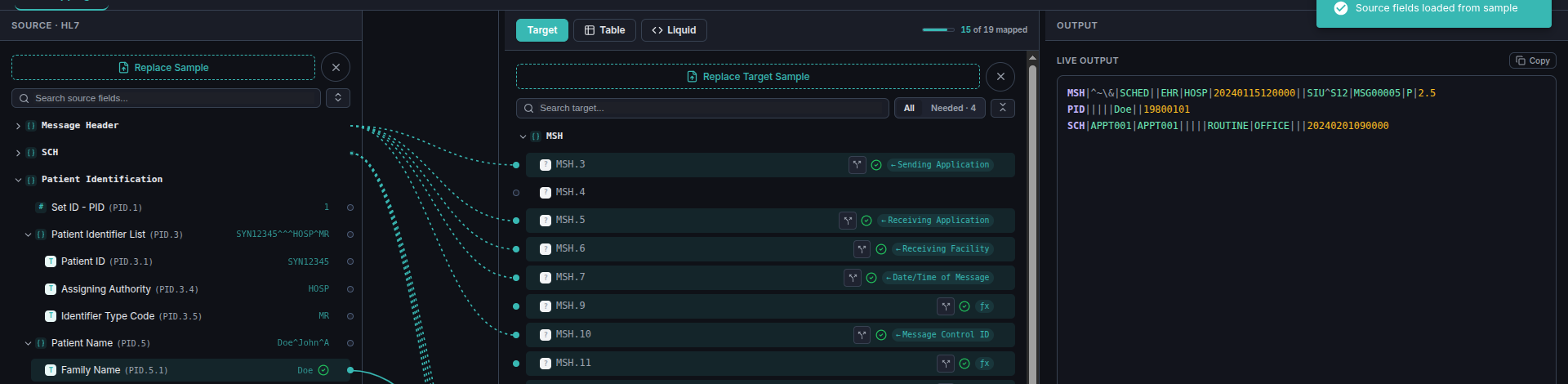
Wiring the patient's family name straight across:
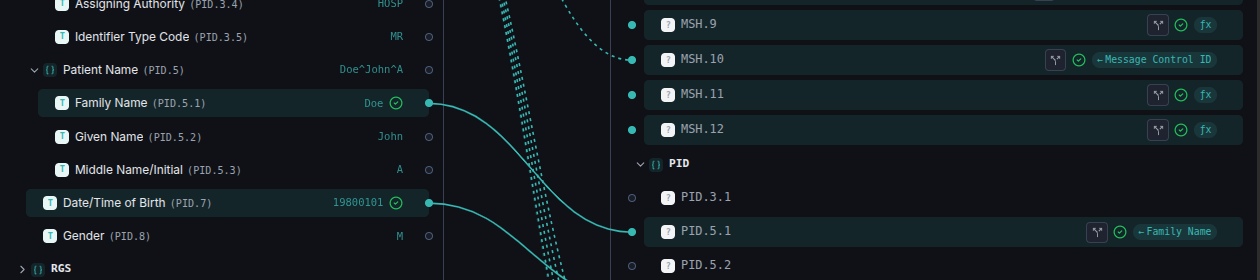
PID.5.1 in the incoming SIU^S12 message.
2 — the target field, also PID.5.1, but in the outgoing message's own layout — the position numbers matching is a coincidence of this example, not a requirement.
Values that could break HL7's own pipe-delimited structure — a stray
| or ^ inside a name or note, for instance — are
escaped automatically on the way out, the same way X12 sanitizes its own
delimiters. You never have to hand-escape a value yourself.

PID segment, exactly where PID.5.1 was wired.HL7 v2 → X12: uncommon, same mechanism
HL7 v2 driving an X12 output is rare in practice — the two formats usually sit on opposite sides of a healthcare data flow, HL7 inside a clinical system and X12 in billing/eligibility exchanges — but nothing about the mapping mechanism cares which formats are on which side. The same drag-a-source-field-to-a-target-field wiring applies here exactly as it does for the common pairs.
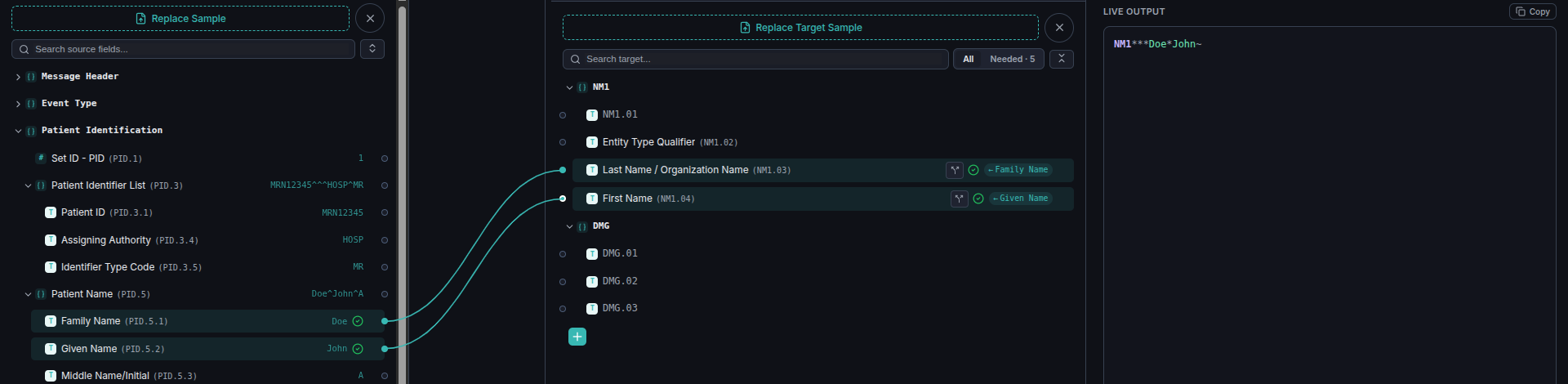
PID.5.1 (Family Name); its sibling
PID.5.2 (Given Name) sits directly below it and is wired the same way.
2 — wired to the X12 target's NM1.03 (Last Name / Organization Name).
3 — PID.5.2 wired to NM1.04 (First Name).
4 — the live X12 output: NM1***Doe*John~, the two mapped values
landing at their correct element positions in the segment, asterisk-delimited like any other
X12 target.
Nothing here is a special case — field-to-field wiring, not source-and-target-format awareness, is what the editor is built around. If a real integration ever needs this direction, it works exactly as shown.
X12 as source
X12 → FHIR: mapping a repeating loop into an array
A synthetic X12 271 (eligibility response) transformed into a FHIR R4
Coverage resource. X12 documents commonly carry a segment that repeats a
variable number of times — here, the HL (hierarchical level) segment
appears three times in the source message. This example shows the editor's answer to
that: map the repeating segment once, and it produces one array entry per occurrence
automatically, the same repeating-group mechanism used for HL7's repeating segments.
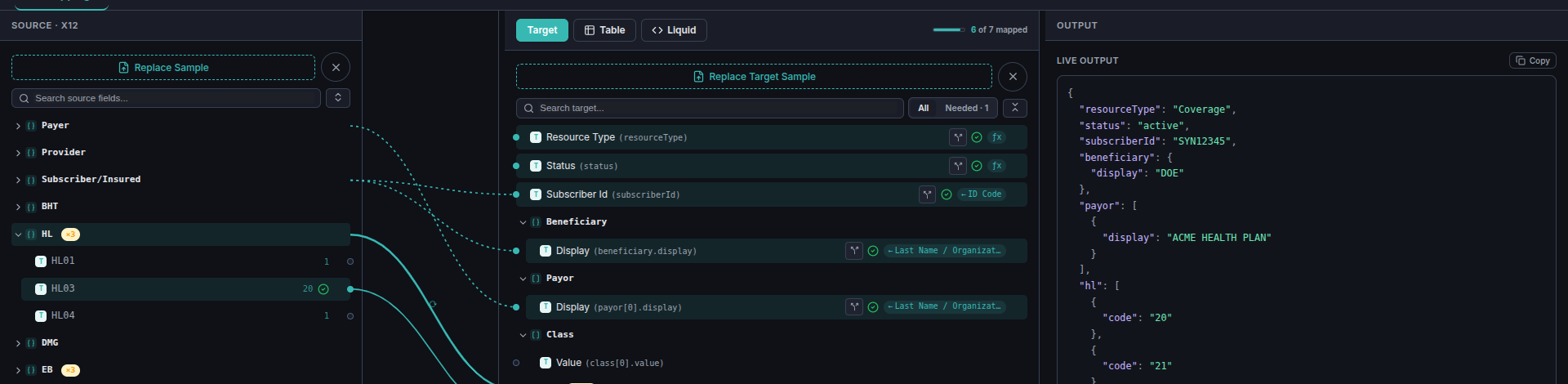
HL segment on the left is
badged ×3 — it repeats three times in this message — and its mapped
fields on the right carry a matching repeat indicator.Wiring one occurrence of the repeating segment is all it takes — the editor applies the same mapping to every occurrence automatically:
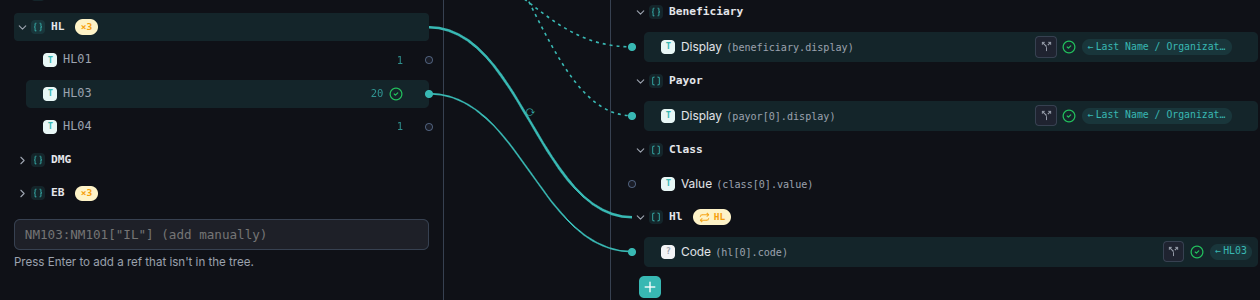
HL
segment, showing its value from the pasted sample (20).
2 — the target's own HL group, marked with a repeat
indicator once a repeating source field is wired into it.
3 — the mapped field, hl[].code, showing where its
value comes from.
The Live Output reflects every occurrence, not just the one wired — three source segments become three array entries:
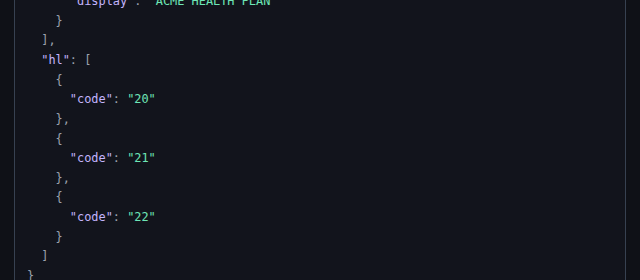
HL segments
(20, 21, 22) each produced their own entry in
the hl array — nothing extra to configure beyond the single field
mapping shown above.X12 → HL7 v2: uncommon, same mechanism
The reverse of the HL7v2→X12 pair above — an X12 eligibility response driving an HL7 v2 output. Also rare in practice for the same reason: X12 belongs to billing/eligibility exchanges, HL7 to clinical messaging, and integrations rarely cross that boundary in this direction. The wiring mechanic doesn't know or care.
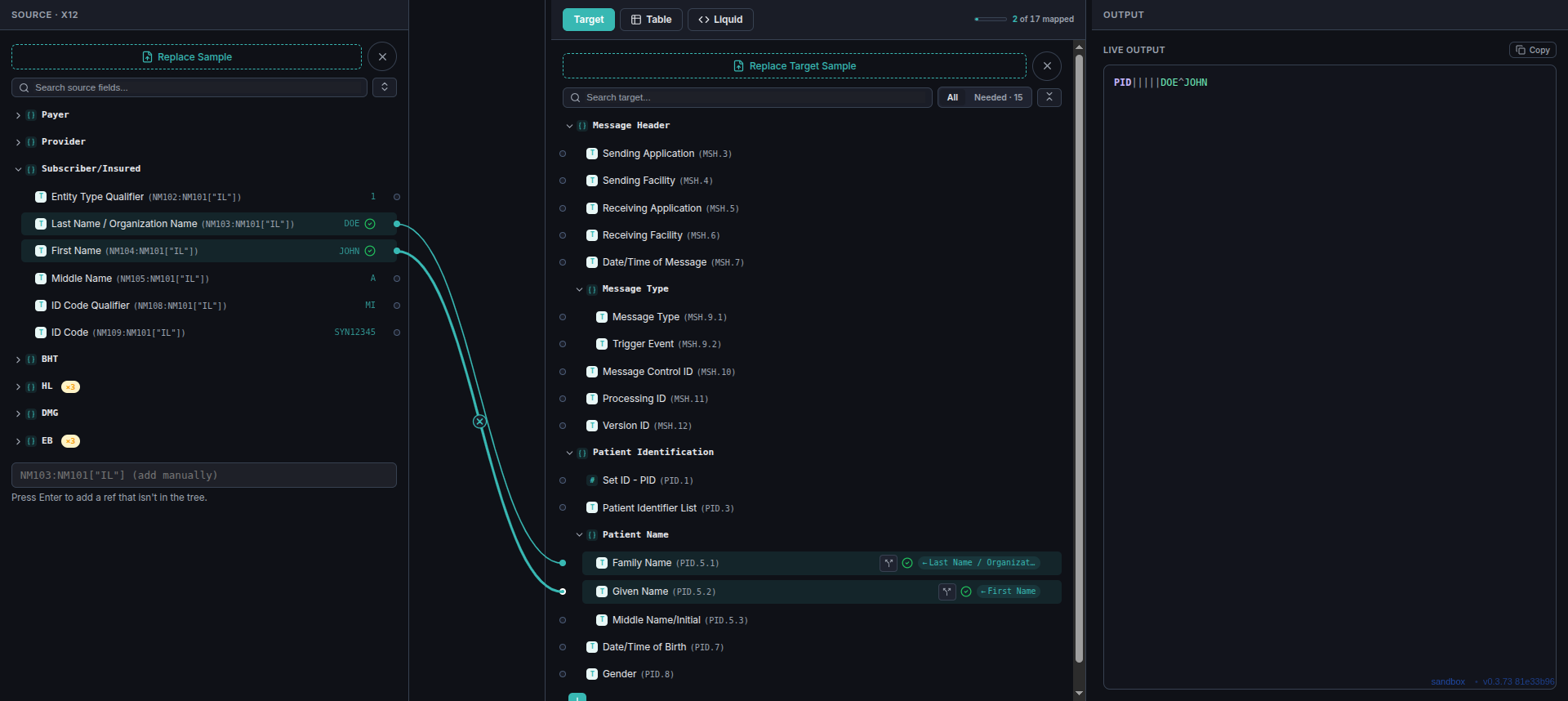
NM103 (Last Name / Organization
Name), on the Subscriber/Insured loop's NM1 segment.
2 — its sibling NM104 (First Name).
3 — wired to the HL7 target's PID.5.1 (Family Name).
4 — NM104 wired to PID.5.2 (Given Name).
5 — the live HL7 output: PID|||||DOE^JOHN — the two mapped
values landing at the correct pipe-delimited position, with the empty positions ahead
of them preserved exactly as any other HL7 target renders them.
Same takeaway as the reverse direction: this is ordinary field-to-field wiring, not a special code path. Any source format can feed any target format through the same mechanism shown throughout this reference.
X12 → X12: reshaping one X12 message into another
An X12 271 eligibility response transformed into a different X12 document's shape —
a common need for the same reason the HL7v2→HL7v2 pair is: a downstream system that
speaks X12 but expects a different transaction set or loop structure than what's
arriving. Source and target are both X12 here, so every field on both sides is a plain
element reference — NM103, NM1.03 — no schema translation
involved, even though the two messages use entirely different qualifiers
(IL — Insured — on the source, QC — Patient — on the target).
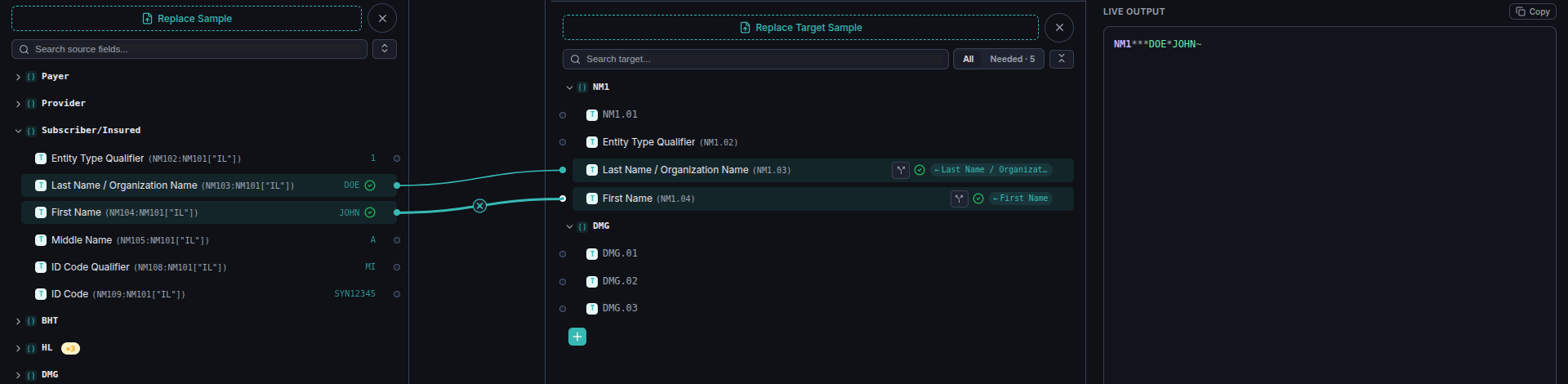
NM103 (Last Name / Organization
Name), on the source message's Subscriber/Insured loop.
2 — its sibling NM104 (First Name).
3 — wired to the target message's own NM1.03 — a
different document, so the field just happens to share a name, not an identity.
4 — NM104 wired to the target's NM1.04.
5 — the live output: NM1***DOE*JOHN~ — the target's
unmapped positions (NM1.01, NM1.02) render blank between
asterisks, exactly as any other X12 target does.
Reshaping X12-to-X12 uses the same wiring as every other pair in this reference — the editor doesn't need the source and target to be different formats, or even different versions of the same transaction set.
JSON as source
JSON → X12: a custom claim to an 837 segment set
A plain JSON payload — no HL7 or X12 involved on the source side at all — transformed into X12 837 segments. Any JSON shape works as a source: the editor reads whatever fields exist in your pasted sample and lets you wire each one, the same way it reads HL7 positions or X12 element numbers.
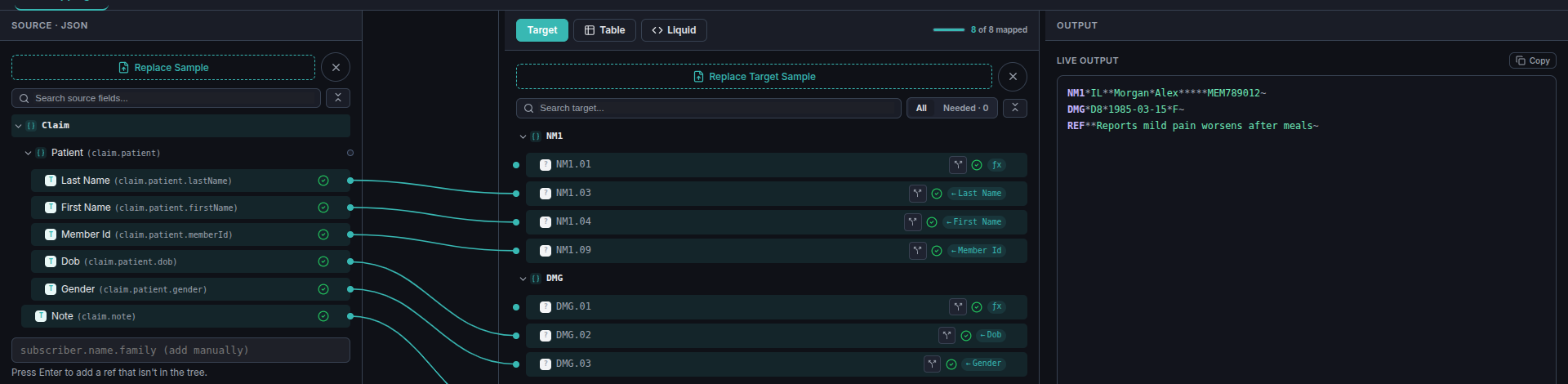
claim.patient.* and claim.note — with no predefined schema to conform to.X12 has no in-band escape character — unlike HL7, which escapes a stray delimiter automatically, X12 can't represent one inside a value at all. So the editor sanitizes it: any character in a source value that collides with an X12 delimiter is replaced with a space on the way out, rather than corrupting the segment. Here, the source note contains an asterisk (X12's own element separator) partway through:
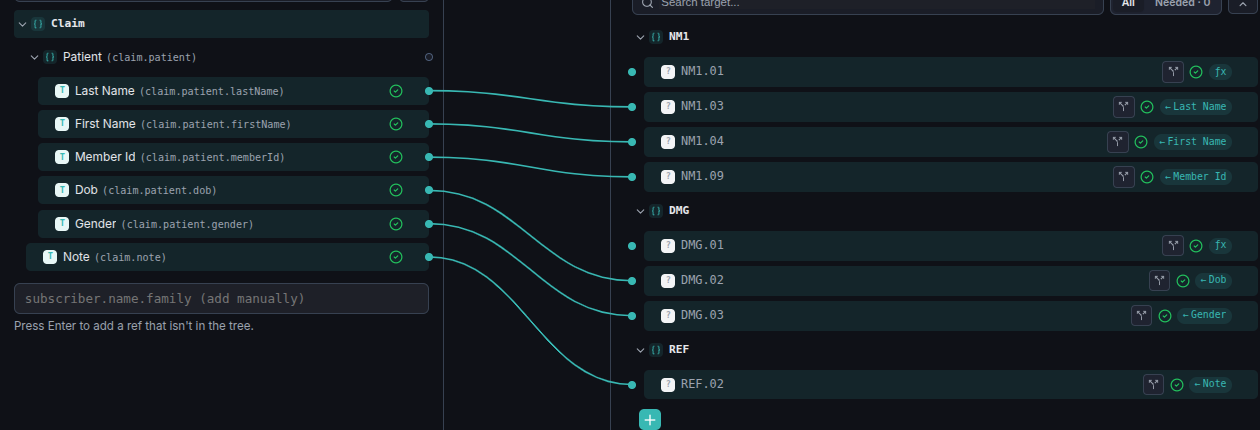
claim.note, holding a value with an asterisk in it: "Reports mild pain*worsens after meals".
2 — wired straight to REF.02, no special handling required on your part.
The rendered segment replaces the asterisk with a space automatically — the message stays structurally valid X12 with no manual escaping:

JSON → HL7 v2: uncommon, same mechanism
A plain JSON payload — no HL7 or X12 on the source side at all — driving an HL7 v2 output. Less common than JSON feeding a FHIR or X12 target, since a system emitting arbitrary JSON is rarely the one that also needs to speak HL7, but the wiring mechanic doesn't distinguish "common" from "uncommon" — it just connects whatever fields exist on either side.
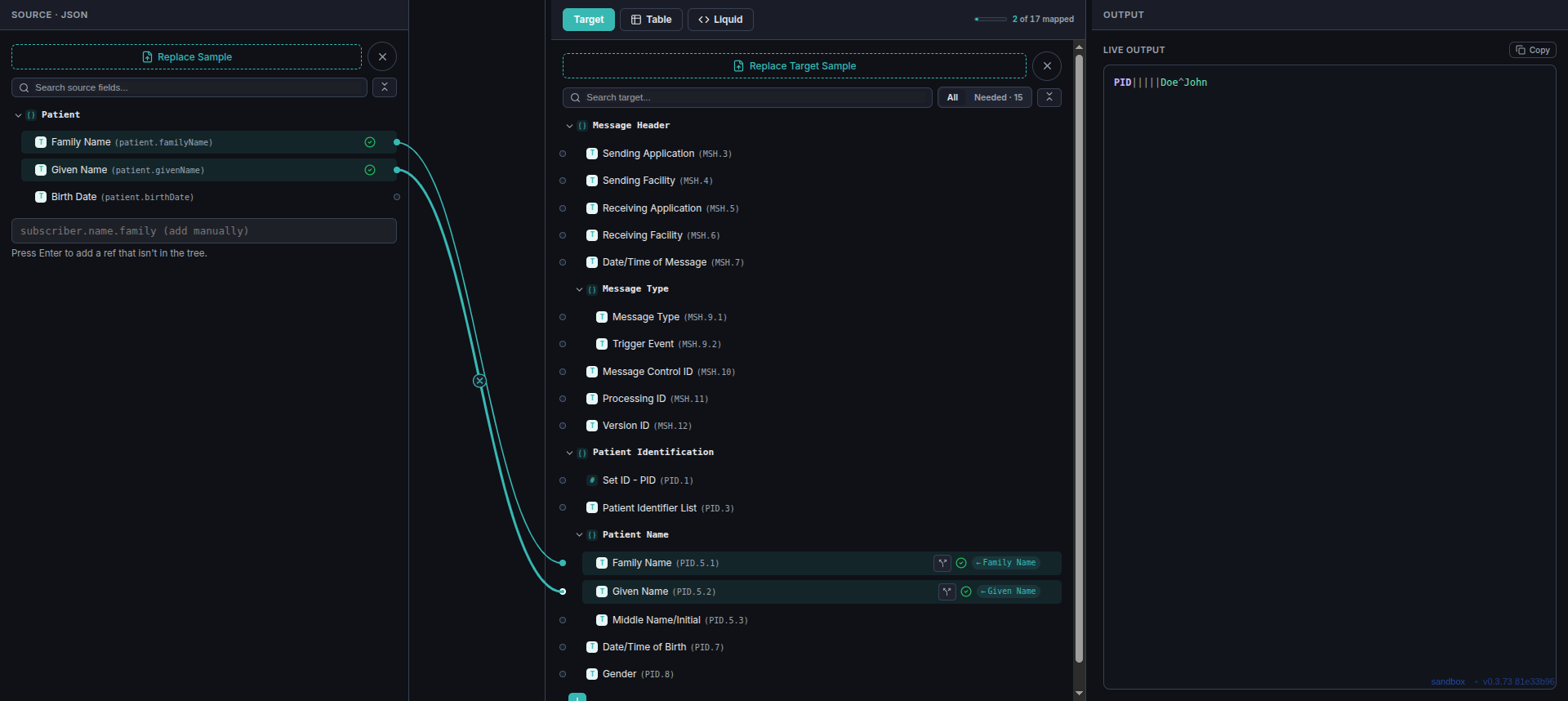
patient.familyName, read straight
from the pasted JSON's own shape.
2 — its sibling patient.givenName.
3 — wired to the HL7 target's PID.5.1 (Family Name).
4 — patient.givenName wired to PID.5.2
(Given Name).
5 — the live output: PID|||||Doe^John, the two mapped
values landing at the correct pipe-delimited position.
The source tree here has no predefined schema to conform to — it's built directly from whatever keys exist in the pasted JSON sample, the same way it would be for a JSON source feeding any other target.
JSON → FHIR: uncommon, same mechanism
A plain JSON payload mapped directly into a FHIR resource shape. This is the one light pair that's arguably not rare at all — a system already emitting structured JSON that needs to become FHIR is a common integration shape — but it's covered here for completeness alongside the other eight combinations, with the same brief treatment.

patient.familyName.
2 — its sibling patient.givenName.
3 — wired to the FHIR target's name[0].family, part of
a real Patient resource sample.
4 — patient.givenName wired to
name[0].given[0] — an array-typed field, handled the same way any other
field is.
5 — the live output: a proper FHIR-shaped
name array with the mapped values in place.
Whether the target is a full FHIR resource, a bare JSON object, an HL7 message, or an X12 document, the editor treats it the same way — a tree of fields waiting to be wired.